
Spinning and Spivi
For all of the Indoor Cycling enthusiasts come ride in comfort on our top-of-the-line indoor bikes. The classes focus on endurance, strength, intervals, and high level of intensity!
indoor cycling
Fully Loaded Spinning Bikes
Is it time to get more out of your aerobic training? Let one of our qualified cycling instructors put you through the paces as you sprint, pedal and climb your way through an exhilarating visual journey road ride. Southrac Cycling Classes are all now using Spivi for metrics and virtual trail rides. See below for info on Spivi, how to setup your account and how to reserve your bike.
Cycling shorts and bike shoes are recommended. Don’t forget to bring your water and a towel. You’ll definitely need those for your ride!
Spivi
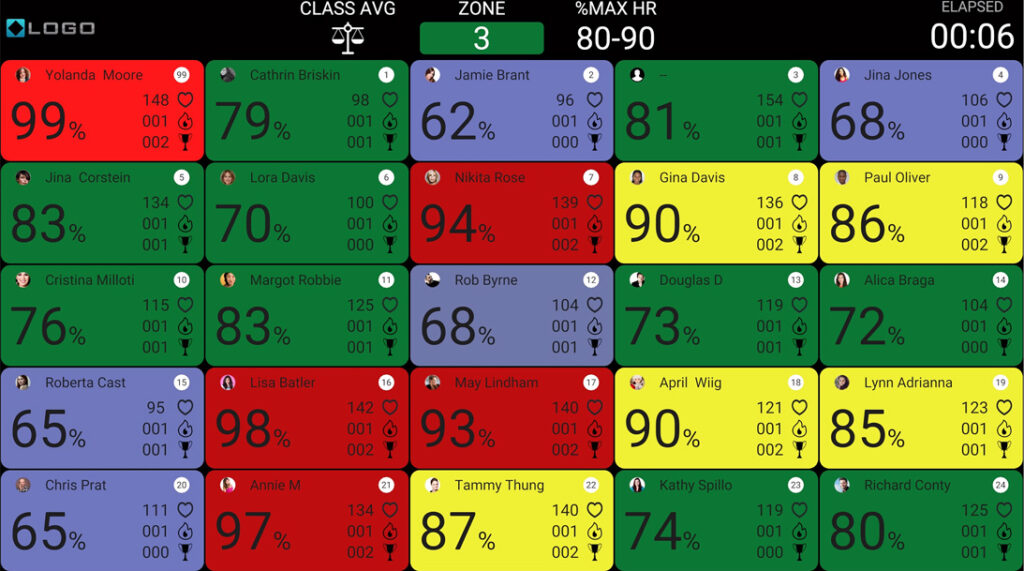
Spivi is an interactive, gamified platform for indoor cycling (and other workouts) that uses real-time performance data (power, heart rate, cadence) to create immersive 3D virtual environments, leader boards, and challenges!
It visualizes your effort on-screen with virtual avatars, tracks stats, and lets you compete with yourself or others, turning fitness into a motivating, data-driven experience with customizable scenes and goals.
In addition to heart rate, power, cadence, speed, distance, and calories, Spivi tracks several other metrics for comprehensive performance analysis. These metrics include:
What is Power, and how is it measured?
Power is energy over time and is measured in Watts units. It is a product of your cadence and resistance level. Training with Power is only available in cycling and requires power sensors equipped bikes. Power is the work output, meaning how much effort you put while pedaling the bike, in each second.
When training with Power, it is important to track Watts over time. Measuring the highest Watts output doesn’t reveal your real performance abilities. You need to check what is the highest Watts output you can sustain over time.
Spivi allows you to see your Power performance over time (last 30 days, last 90 days, last 180 days, and last year) in the My Workouts section of spivi.com, under Trends.
What is Energy? (Measured in Kilojoules or KJ)
Kilojoules (Kj) A kilojoule is a measuring unit that let us know how much energy was expended over a certain period. Joules are an international standard unit of work/energy. 1 Watt = 1 joule applied for 1 second. 1000 joules = 1 kilojoules (KJ) Kilojoules = watts X seconds / 1000 KJ can also be converted to Calories (Kcal), to display the burned calories during a workout: 1 kJ = 0.2 Calories (Cals) 1 Calorie = 4.2 kJ
What are Watts per Kilogram? (W/Kg)
W/Kg Another way to measure Power is by calculating how much weight in Kg we can move to generate the Watts. To do that, you simply divide Watts in your weight in Kilograms. A cyclist weighing 190 pounds (86 kg) will need to generate more Watts than a 110 pound (50 kg) cyclist to maintain the same speed when using the same resistance. If you check their W/Kg, you’ll be able to compare their power outputs.
To measure your power output, you can divide your FTP score with your weight in Kg. The result is the W/kg output of your FTP (maximal average power output over an hour).
What is FTP? (Percentage of Functional Threshold Power)
Functional Threshold Power (FTP): is your maximal average power output over an hour cycling on a flat road. I.E if you can cycle at an average of 250 watts during a 60 minutes workout your FTP is 250.
As a key metric in performance training, FTP is one of the most important fitness attributes on any user profile at Spivi. FTP changes frequently, depending on one’s fitness and can be used to track and identify performance trends. Increasing FTP value over time reflects improvement of your fitness level and vice versa. It is highly recommended to perform FTP test every few weeks to track your fitness level and improve it over time.
Miscellaneous Terms to Know
- Average Metrics (including average power, average RPM, average speed, average heart rate, etc.)
- Rank (position within the class, typically based on accumulated virtual distance)
- Spivi Ecosystem Points (SEPs), which is an innovative, effort-based metric that accounts for a person’s individual fitness level (age, weight, gender, personal records) to ensure a fair comparison of effort across diverse fitness levels.
- Performance Zones, which are color-coded visualizations indicating whether a member is in their target zone (e.g., %FTP or %MHR zones).
- Personal Records (PRs), which are tracked and celebrated as achievements and milestones.
SPIVI FAQs
How to reseve your bike?
To reserve your bike for our cycling classes, simply use the Spivi app. Start by opening the Spivi app in your app store on your Apple Iphone or android phone. Once downloaded you will need to create your account. It will ask you for the state, city and club location. Choose South Reno Athletic Club. Once you’ve created your account and login you will be able to see the upcoming classes. Choose your preferred class time and click on the class. You will then be able to select an available bike. Yellow means the bike is already reserved. Once you select a preferred bike in the Spivi app, it will be automatically assigned to you for future classes, ensuring a consistent experience each time you ride. You can reserve bikes 6 days in advance.
It’s that easy to secure your spot and get ready for an energizing ride!
How to download the app?
To download the Spivi app, simply head to your device’s app store—either the Apple App Store for iOS users or Google Play Store for Android users. In the search bar, type “Spivi” select the app from the results. Tap the “Download” or “Install” button to begin the installation process. Once the app is downloaded, open it and follow the on-screen instructions to create an account or log in. With the Spivi app you will be able to update your account and avatar, set your favorite bike, change settings to not show your information on the screens in the class but still collect your data, reserve classes, and more. With the Spivi app ready on your device, you’ll have seamless access to reserve bikes and track your cycling classes!
What information will be tracked?
The Spivi cycling app collects a variety of valuable information to enhance your cycling experience. Users can track their performance metrics, including speed, distance, calories burned, and heart rate, providing insights into workout intensity and progress over time. The app also offers data on personal records and achievements, helping you set and reach fitness goals. Additionally, Spivi allows users to view class schedules, reserve bikes, and connect with fellow cyclists, fostering a community atmosphere. By analyzing this data, the app helps create customized workouts and offers feedback to improve overall performance.
Can I take the class but not display my information on the screens?
YES! To take a cycling class without displaying your information on the Spivi screens, start by logging into the Spivi app before your class. Navigate to the settings or privacy options and select the option to hide your profile from the display screens. When you arrive at the class, ensure that you connect to the bike and confirm your settings. This way, you can enjoy the workout without your performance metrics being shown publicly. Your data will still be recorded for personal tracking, allowing you to monitor your progress privately after the class. Your instructor can also remove you from showing on the screen but you will not be able to track your metrics this way as you will only be removed from the bike. Enjoy your ride!
Can I still attend a class without reserving a bike?
Yes, you can still take cycling classes even if you didn’t reserve a bike, but availability may be limited. We encourage you to arrive early to the class, as bikes are often assigned on a first-come, first-served basis. If there are bikes available, you can join the class without a reservation. However, to ensure your spot and avoid disappointment, we recommend reserving your bike in advance through the Spivi app. This way, you can secure your preferred bike and enjoy a seamless cycling experience!
Who can I contact for help with my Spivi App?
Please email info@southrac.com for questions about your app/account or ask your cycling instructor.
What if I reseve a bike and don't show or am trying to get a bike and someone doesn't show?
Any reservations are void at the start of class times if not present, in other words if the class has started and you are not on your bike, your reservation is no longer valid and someone waiting can take your bike. Further, if you make reservations and you do not show more than twice your availability to reserve may be withdrawn. Remember to cancel your reservation if you are unable to make it to the class or on time.
When do reservations open?
Reservations open 6 day before each class. You will not be able to reserve a bike before the 6 day period opens.


South Reno Athletic Club
(775) 853-4050